Review Comments (21) Screenshots (13) Questions & Answers (6/8) Votes (930) Awards (9) Wiki  
(930)
5.34.55.3
www.apple.com
Freeware
323 604 people
Download Safari

36.52 MBDownloaded 33267 times

This software was checked for viruses and was found to contain no viruses.
Click here to see antivirus report.
 
Video tutorial for Safari 5.1
Frame

Review

This is official description

With Safari, nothing comes between you and the web — not even the browser window.With Top Sites, Safari keeps a running tally of the websites you visit and creates a graphically rich page that displays up to 24 thumbnails of your favorites.Now you can see web pages full screen, free of desktop distractions.
 
The following review written by one of the Software Informer contributors applies to version 3.5

Safari is an easy-to-use web browser by Apple. With its simple and elegant user interface, Safari allows you to surf the web in the fastest way ever known in a browser. The only disadvantage I found is that Safari lacks any advanced security settings. You can block third-party cookies and some Web scripts, but you can't enter specific Web sites from which to accept or reject cookies, as you can with both Opera for Mac and IE. However, it offers many great things apart from its incredible speed. For instance, tabs can be dragged out of and inside windows, effectively moving a tab from one window to another and also drag tabs out as individual windows. Another great feature s that now you can keep track of your sessions, since you have the option to restore all the windows that were open during the previous session. Moreover, you can also install plug-ins for Safari on Windows to get a richer browsing experience. Of course, the program also allows you to import and bookmark RRS feeds to enjoy instant news updates without leaving the browser.
  • Easy to use. Simple and elegant user interface.
  • Lacks any advanced security settings.

Reviewer rating:

Reviewed: 4 years ago

What's new in version 5.1

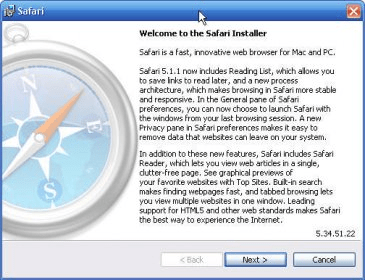
Multi-Touch is built into Safari on OS X Lion, so you can tap, scroll, and swipe your way around the web. And it’s just as smooth, natural, and fun on the Mac as it is on an iPad, iPhone, or iPod touch.You’ll be even more immersed in the web when you see it full screen with OS X Lion. Web pages take up every inch of your display so there's nothing to distract you from what’s onscreen. You can open many web pages full screen — dedicate one page for Twitter feeds, one for video, and another for browsing, for example — and swipe back and forth between them. Or open just one web page full screen while other open pages stay the original Safari window size. And it's just as easy to switch from full-screen browsing back to your desktop.Browse, shop, read, and do everything you do on the web from the safest, most secure browser we’ve ever built.Some websites you visit can leave data on your computer which can be used to track where you go on the web. The new Privacy pane in Safari preferences shows what kind of data websites are storing and lets you remove it. You can also customize cookie settings and choose whether websites can request your location information.Safari makes sure your information is kept private. Whenever you come across a web form, Safari automatically detects it and lets you choose to use AutoFill to complete the form with information from your Address Book. No information is ever added to a form automatically unless you say it’s OK.When you launch Safari on Lion or restart your Mac, Safari automatically restores the open windows and tabs from your last browsing session. So you can continue right where you left off. On Snow Leopard and Windows, you can choose to have Safari automatically restore your windows in the General pane of Safari preferences.Let's say you type "app" into the Search field. Now you can search the web page for words that start with "app" or that contain "app." Just click the magnifying glass to switch between the two options.When you first log in to your Google, Yahoo!, or AOL accounts in Safari on Lion, Safari asks if you want to use these accounts with Mail, iCal, iChat, and Address Book. So you’re off to a quick, convenient start.Everything you do in Safari is more stable and responsive. The new process architecture divides the heavy lifting for smoother sailing. One process handles everything coming from or going to the web, while the other manages interactions with the Safari interface — such as creating a bookmark or searching your history. Now an unresponsive website won’t affect Safari, so you can keep browsing and browsing.
Report a wrong version Report a wrong program title Suggest a correction

Screenshots

General view General view Main window Main window Main window Main window bookmarks bookmarks
All 13 screenshots

Latest comments

Guest #22026472(beginner) 5 months ago 
Not bad. In my opinion this browser is worse than Opera & Firefox, but much better than IE.
Reply
Bùi Th? M? Giang(beginner) 9 months ago 
— Safari Browser
Pros: It's really fast
Cons: But it has so many errors
Comment: It suddenly turn off when I'm browsing! So annoyed!!
Reply
Guest #19234890(beginner) 9 months ago 
why cant i get on safari??????
Reply
Add new comment All 21 comments

E-mail Address:

Password:

Register now »

Forgot password?

Sign in with:
Facebook Account
.htm Safari Document
.xml Safari Document
.html Safari Document
.svg Safari Document
.url
Download Software Informer Client
Web Browser Competition Up Close and Personal
I've been a devoted fan of Google Chrome since 2008. I cannot imagine myself using any ...
All articles
Copyright © 2012, Informer Technologies, Inc. About| Terms & Privacy| FAQ| Feedback & Support| For Developers